
Are you ready to take donations?
If you expect to point ads at your website and get donations, there needs to be a simple-to-use donation form plus persuasive writing that convinces them to take that action immediately.
Donations form checklist
Not all donation platforms provide the same features and options, but the following list is good practice.
- Before the form, do you tell potential donors why you need their money and how you will use it, and do you persuasively ask them to give?
- Is your donation form easy to use?
- Do you ask for the minimum information necessary to complete the donation? The more fields in your form, the fewer people will complete it.
- Does your donation form ask donors to cover the processing fee?
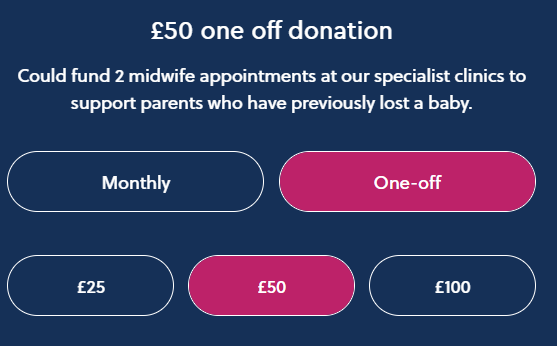
- Do you list suggested donation amounts, stating what each one could help you achieve?
- Can donors give monthly as well as make one-off donations?
- Is transaction and revenue data sent to the monetization report in Google Analytics? Essential if you want to optimize Google Ads campaigns for donation revenue.
- On completion, are donors taken to a confirmation page where you can make additional asks?
- Does the donation page include a clear statement that all proceeds benefit the nonprofit, giving the nonprofit's registration details?
- Is there a prominent navigation item / button that enables people to reach the donation form in a single click from any page?
Be transparent about your nonprofit status
There is a Google Ads rule that any account soliciting donations must clearly state on their website that it's a nonprofit, registered in which country, giving the registration number. Whilst you should already publish that information in the website's footer, it's a good idea to state it prominently within the text of the donation ask.
You can only use Google Ads to raise funds for your own nonprofit, not for other organizations (other nonprofits or hospitals for example), or individuals.
Read the Ad Grants website policy at support.google.com/grants/answer/1657899 in conjunction with the solicitation of funds section of the restricted businesses policy at support.google.com/adspolicy/answer/6368711.
Suggested amounts and impact descriptions
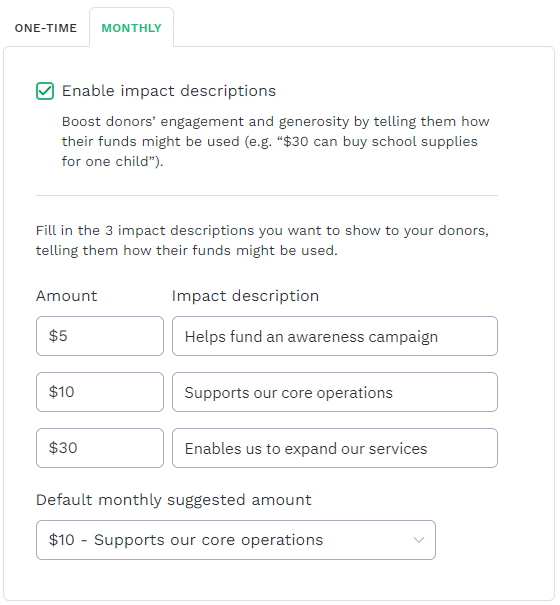
It's good practice to tell people how you use donations. Suggested amounts provide context that is likely to encourage a donor to give. The screenshot below shows how you enter suggested amounts into my recommended donation platform Fundraise Up.
The screenshot below shows how a mothers and babies nonprofit displays the suggested donation amounts on their website.
How to check whether donations are tracked in Google Analytics
There is a separate lesson in this course about how to set up donation revenue tracking.
In Google Analytics navigate to the Monetization > E-commerce purchases screen and choose a sensible date range. The screenshot below shows what to expect: donations listed by item name. If you have multiple donation forms or different types of donation, your donation platform may name them differently, or all the same. You should see the number of items purchased plus the item revenue. The screenshot below shows an aid organization's revenue from online donations in the last 28 days.

Resources
Fundraise Up case studies
The donation platform I recommend for its smart features, ease of use, and straightforward Google Analytics integration, which makes it ideal when backed up with Google Ads donation campaigns.
11 comments